A while ago, I built a macOS menu bar app called Quickgif. It scratched an itch of mine to have a GIF picker that I can use across any app without having to manually download GIFs, or deal with the various implementations used by different apps.
I decided to built it with Flutter to see if it is possible to get a native feel without actually writing a native macOS app. After some tinkering, the app felt pretty native and smooth (at least to me). I released the app and picked up a few users, which seemed pretty happy.
Until, some feedback started popping up
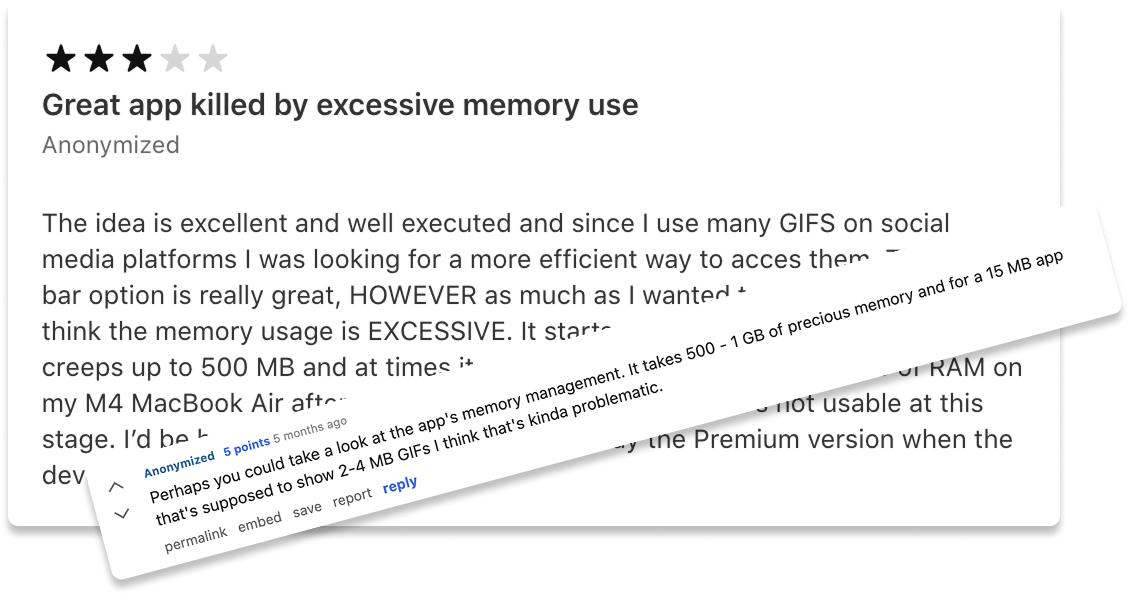
Hm, lets check.
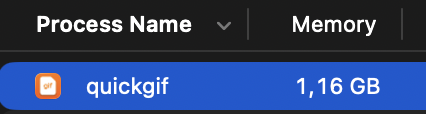
That’s not good. And it gets worse the longer you scroll.
Quickgif lets users scroll an incredibly long list of GIFs,
which is obtained directly via Tenors API. Tenor returns up
to 50 GIFs at once, given a start position. This is quite neat
because it allows me to fetch n GIFs on demand,
while the user scrolls. And that’s exactly what Quickgif does,
it loads up to n GIFs into memory, and requests
more as the user scrolls through the list. However, if we do
not release GIFs from memory further up the list, we end up
with a huge memory footprint which increases drastically as
users scroll. Let’s investigate in detail whether that’s
happening.
Releasing cached images from memory
First, I fired up Flutters profile mode, which I think is pretty nice. This quickly confirmed my suspicion that we probably have some issues when releasing the images from memory after we scrolled past them.
Let’s look at how the list is implemented (simplified here)
child: StreamBuilder<List<GifMetadata>>(
    stream: widget.gifProvider.stream,
    builder: (context, snapshot) {
      [...]

      return MasonryGridView.count(
        cacheExtent: 10,
        controller: _scrollController,
        crossAxisCount: 5, // 5 GIFs per row
        crossAxisSpacing: 4.0, // Space between columns
        mainAxisSpacing: 4.0, // Space between rows
        itemCount: widget.gifProvider.currentGifs.length,
        itemBuilder: (context, index) {
          final gif = safeGet(widget.gifProvider.currentGifs, index);

          return GifContainer(
              [...]
              setFavorite: setFavorite,
              copyEvent: copyEvent,
              key: ValueKey(gif.id),
              gif: gif,
            ),
        },
      );
    },
  ),
),
The StreamBuilder handles the stream of GIFs
coming in, which are dynamically loaded as soon as the user
scrolls past a certain threshold. We then load a bunch of new
GIFs into memory and append them to the list.
MasonryGridView is part of a grid view library
called flutter_staggered_grid_view
which uses BoxScrollView and the simply named
SliverSimpleGridDelegateWithMaxCrossAxisExtent as
a delegate under the hood, seems similar to the usual flutter
lists implementations to me.
Also, I already limited the cacheExtend to a mere
10 images. So excessive caching does not seem to be the
issue.
GifContainer has been deliberately implemented
to be stateless and uses CachedNetworkImage under
the hood. CachedNetworkImage is pretty awesome,
as the name suggests, it caches loaded images on disk to be
able to retrieve them later. It saved me a lot of time and is
one of the reasons why scrolling around the app works
smoothly. However, after researching for a bit, it seems like
I’m not the only one running into memory problems with the
widget link.
I tried some of the suggestions in the thread but did not see
any significant results. Furthermore, others
seem to report even worse problems with Flutter’s default
ListView and Image widgets. Let’s
try some of the suggestions there and use
ExtendedImage.network which allows caching and
includes the clearMemoryCacheWhenDispose
flag.
This results in stable 500mb+ memory, and it does not seem to increase while scrolling around a lot. That’s already more than half, compared to before. But 500mb+ is still excessive, especially because the app keeps running in the background. I do use a bunch of menu bar apps myself, and it looks like at least JetBrains Toolbox and a few others seems to suffer from similar memory issues. Still, I did not want to accept this much constant memory overhead.
Killing flutter’s engine manually
Flutters profile mode earlier indicated that the engine itself and some platform specific plugins take up quite a bit of memory by themselves. For reference, running Flutters basic example app in release mode takes up around ~170MB while active on my machine.
What if we kill the whole flutter engine and its plugins while the app is in the background? That would free up (almost) everything. So, let’s see how Flutter normally displays apps on macOS. This is how a default flutter app is launched on macOS devices.
class MainFlutterWindow: NSWindow {
  override func awakeFromNib() {
    let flutterViewController = FlutterViewController()
    let windowFrame = self.frame
    self.contentViewController = flutterViewController
    self.setFrame(windowFrame, display: true)

    RegisterGeneratedPlugins(registry: flutterViewController)

    super.awakeFromNib()
  }
}
We create a new NSWindow, wait until the app
wakes up, add the FlutterViewController, register
the plugins and call it a day. This works for most macOS apps,
but because we are talking about a menu bar app, we don’t want
to launch an NSWindow right away, we only want to
show the window after a user presses on the little menu bar
icon, shown below.

There is a great sample project on GitHub on how to get a menu bar app going with flutter, as this is not directly supported for the moment. My implementation was mostly based on the sample. Here are some of the relevant code parts:
@NSApplicationMain
class AppDelegate: FlutterAppDelegate {
  var statusBar: StatusBarController?
  var popover = NSPopover.init()
  override init() {
    popover.behavior = NSPopover.Behavior.transient
  }

  override func applicationShouldTerminateAfterLastWindowClosed(_ sender: NSApplication) -> Bool {
    return false
  }

  override func applicationDidFinishLaunching(_ aNotification: Notification) {
    let controller: FlutterViewController =
      mainFlutterWindow?.contentViewController as! FlutterViewController
    popover.contentSize = NSSize(width: 360, height: 360)
    popover.contentViewController = controller
    statusBar = StatusBarController.init(popover)
    guard let window = mainFlutterWindow else {
        print("mainFlutterWindow is nil")
        return
    }
    window.close()
    super.applicationDidFinishLaunching(aNotification)
  }
}
This does a few things:
- Initializing an NSPopover
- Ensuring the application is not terminated after being
closed
- Attaching Flutters FlutterViewController to our
Popover
- Creating a StatusBarController, which is not
really relevant for this post
But this setup never releases
FlutterViewController and its underlying engine,
because App Kit by itself seems to keep it alive. Let’s change
that by extending FlutterViewController and
explicitly shutting down the engine after our panel is
closed.
After fiddling around a lot and getting stuck for half a
week trying to get NSPopover to behave like I
wanted, I ended up migrating to NSPanel which
makes things (more or less) easier. The implementation I ended
up with looks something like this:
class Panel: NSPanel {
    override var canBecomeKey: Bool { true }
    override var canBecomeMain: Bool { true }

    [...]
}

class PanelFlutterViewController: FlutterViewController {
    var launchChannel: FlutterMethodChannel?
    var openCloseChannel: FlutterMethodChannel?

    weak var delegate: PluginDelegate?

    init() {
        let engine = FlutterEngine(
            name: "engine_\(UUID().uuidString)",
            project: FlutterDartProject(),
        )
        super.init(engine: engine, nibName: nil, bundle: nil)
        self.view.translatesAutoresizingMaskIntoConstraints = false
    }

    [...]
}

class MenuBarController: NSObject, PluginDelegate, PanelDelegate {
    func panelClosed() {
        // 1. Remove Flutter view from the hierarchy.
        panel?.contentViewController = nil

        // 2. Disconnect delegates to prevent further messages.
        viewController?.delegate = nil
        panel?.delegate = nil

        // 3. Unregister channel handlers.
        viewController?.launchChannel?.setMethodCallHandler(nil)
        viewController?.openCloseChannel?.setMethodCallHandler(nil)

        // 4. Shut down the engine.
        viewController?.engine.shutDownEngine()

        // 5. Nil out references to allow everything to be deallocated.
        viewController?.launchChannel = nil
        viewController?.openCloseChannel = nil

        viewController = nil
        panel = nil
    }

    [...]
How does our RAM footprint look like after our change and if our app is in the background?

That’s better! We decreased the memory footprint in the background by 90%+. Still, ~80mb is quite a lot for a tiny app, but for now I’m pretty satisfied, given that this is not a native app.
I should be done now right? Wrong
Plugin Problems
Because Quickgif needs many features close to the specific
platform it runs on, I added the package
super_native_extensions pretty early during the
initial development. The package is awesome, it allows my
users to drag GIFs directly into any app, adds hotkey support
and manages the clipboard state for me. It is also officially
endorsed by flutter itself.
However, because we kill flutters engine now, keyboard
events will not be received from dart and the app can not be
launched. That’s why I ended up using Swifts excellent Hotkey package,
while removing any hotkey usage from
super_native_extensions. But, from what I can tell,
the package seems to swallow all macOS Hotkey events right
after it is launched, breaking some of my app’s functionality.
Fortunately, that’s not a big deal, I ended up forking the
plugin and disabling the hotkey part.
Next, I ran into random crashes related to me killing and
starting new engines as soon as users open / close my app.
Users can do this quite rapidly, because Quickgif can be
launched and dismissed via a global shortcut. The crashes
seemed to be related to the same package. I started
investigating and ended up learning a bit about how
super_native_extensionsworks. Surprisingly, large
parts of it are written in Rust, allowing the author to build
platform-agnostic code, e.g. related to drag & drop, in a
single language. You can read about his setup in this blog
post. After digging for a while, I ended up right
here:
+ (void)registerWithRegistrar:(NSObject<FlutterPluginRegistrar> *)registrar {
  int64_t engineHandle = nextHandle++;

  IrondashEngineContextPlugin *instance =
      [[IrondashEngineContextPlugin alloc] init];
  instance->engineHandle = engineHandle;

  // There is no destroy notification on macOS, so track the lifecycle of
  // BinaryMessenger.
  _IrondashAssociatedObject *object =
      [[_IrondashAssociatedObject alloc] initWithEngineHandle:engineHandle];
  objc_setAssociatedObject(registrar.messenger, &associatedObjectKey, object,
                           OBJC_ASSOCIATION_RETAIN);

  // View is available only after registerWithRegistrar: completes. And we don't
  // want to keep strong reference to the registrar in instance because it
  // references engine and unfortunately instance itself will leak given current
  // Flutter plugin architecture on macOS;
  dispatch_async(dispatch_get_main_queue(), ^{
    _IrondashEngineContext *context = [_IrondashEngineContext new];
    context->flutterView = registrar.view;
    context->binaryMessenger = registrar.messenger;
    context->textureRegistry = registrar.textures;
    // There is no unregister callback on macOS, which means we'll leak
    // an _IrondashEngineContext instance for every engine. Fortunately the
    // instance is tiny and only uses weak pointers to reference engine
    // artifacts.
    [registry setObject:context forKey:@(instance->engineHandle)];
  });

  FlutterMethodChannel *channel =
      [FlutterMethodChannel methodChannelWithName:@"dev.irondash.engine_context"
                                  binaryMessenger:[registrar messenger]];
  [registrar addMethodCallDelegate:instance channel:channel];
}
To support drag & drop and other features,
super_native_extensions internally uses an
IrondashEngineContext to obtain
FlutterView, the engine handle itself and more.
The snippet above shows the register process of the plugin and
how it tracks the engine lifecycle. Seems like the current
Flutter plugin architecture is not particularly great for my
current use case, which involves creating and destroying
engine instances quite often.
I tried to fix some of the race conditions which probably occur because of how the plugin has to track the engine instance, but ended up having to scrap the library entirely. Fortunately, I only depended on two features of the lib. Dropping files outside the app and controlling the clipboard. There are multiple flutter packages out there to manage the clipboard for many platforms, no issues there. But I could not find a viable alternative to drag & drop arbitrary files outside the main app window.
So I ended up writing my own implementation, called flutter_drop.
Because Quickgif is only available for macOS right now, the
implementation was surprisingly straight forward, and I ended
up finishing most of the work in a day or two. I’m not
planning on expanding or publishing the plugin any time soon,
given that super_drag_and_drop already fulfills
most use cases, supports all major platforms and has more
features. But maybe someone else finds some use in it.
Flutters Keyboard State Machine
Next, I noticed that sometimes no keyboard input is supplied to the app. I could reproduce the issue semi reliably when opening up the app via its shortcut.
This is what showed up in the logs
A KeyUpEvent is dispatched, but the state shows that the physical key is not pressed.
Digging through flutter source, we can see a bunch of asserts to make sure flutters keyboard state machine is not in an invalid state.
void _assertEventIsRegular(KeyEvent event) {
    assert(() {
      [...]
      if (event is KeyDownEvent) {
        assert(
          !_pressedKeys.containsKey(event.physicalKey),
          'A ${event.runtimeType} is dispatched, but the state shows that the physical '
          'key is already pressed. $common$event',
        );
      [...]
    }
  }
And we can also find a GitHub issue of people running into similar problems link. Fortunately, per default, asserts in dart are not enforced in release builds. And the app seems to work fine anyway. But it still caused me a bunch of head-scratching.
Conclusion
When I first read the reviews, I expected to fix a simple lazy list memory issue, which would take me like half a day to fix. In reality, I had to debug a lot of different code, written at least four different programming languages, create my own flutter host and build my own drag & drop plugin. This was a lot of fun and I learned a lot! But it also caused me lots of head scratching to find proper solutions which work reliably. So hopefully someone else who stumbles across this will be able to save some time.
Would I have had these problems if I just built the app
directly in SwiftUI?
Probably not.
Would I build something like this in Flutter again?
Probably, if I actually target other platforms.
Did I enjoy using Flutter during the development
process?
Absolutely, I was able to prototype the initial
version of the app extremely quickly, because of Darts /
Flutters simplicity, ecosystem and widespread usage. Compared
to Apple’s documentation, it was a breeze.
Would I recommend flutter for building macOS apps?
Maybe, if you have some experience using it on mobile
platforms, go for it! Otherwise, check out some of the other
numerous solutions or just use SwiftUI if you only target
macOS.
Thanks for reading!